Fred Harmon
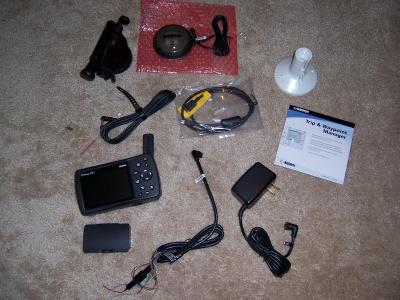
More photos of this unit can be found here:
http://www.pbase.com/fredharmon/376c
So you don’t like to ride in the rain. Neither do I. And I find it increasingly harder and harder to find a good television news station that displays the weather radar images for more than a few brief seconds before they change to a commercial. For several years now I have been saying “If only I could have a weather radar image displayed on my GPS.”
Well, now the only question seems to be, how much are you willing to pay to have it? Would you be willing to cough up roughly $1,000 for the GPS and software and memory cards and then pay another $30 a month for the weather data? If so, read on. If not, you probably should stop now, because if you continue reading this you may develop the dreaded GPS-Envy syndrome.
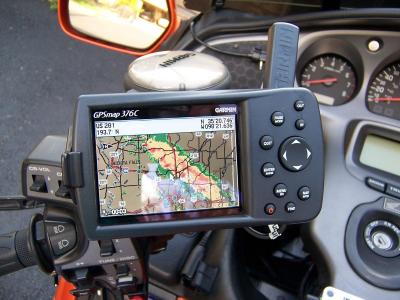
Here is the GPS mounted on the bike
Ok, lets start by discussing the cost of all this and get that out of the way. I purchased my GPS from http://www.getfeetwet.com for $770. They have good service and about the best prices I could find, and I would highly recommend them. In addition to the GPS you will also probably want the Garmin City Select software and a data cartridge. The software costs roughly $120 and a 128mb cartridge is $80 and a 256mb cartridge is $110. The software and data cartridge allow you to load more detailed maps and points of interests (hotels, restaurants, gas stations etc) into the unit. The unit has an internal base map that covers all major roads and highways, but for motorcycle travel it is nice to have the smaller roads and streets loaded into the unit from the City Select software. They also offer a Auto Navigation kit package ($230) that includes the City Select software, a data cartridge, an Auto mount, and a cigarette lighter adapter with built in speaker all bundled together. If you think you ever might use the GPS in your car, this is probably the way to go, as the bundled kit will save you some dollars. So for $770 plus $230 for the Auto Nav kit, you are ready to go, almost. In order to get the weather information, you will have to subscribe to the XM Radio weather package for a minimum of $30 plus a one time activation fee of $50. Ok, now we are up to $1,080 including the first months service.
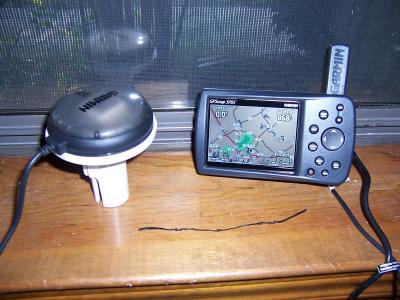
GPS with XM Antenna on supplied marine mount
Are you still with me? Ok, now on to the meat of the review. Let me state right up front, that the 376C is designed mainly as a Marine GPS but also has Automotive functions. It has many Marine functions that will go unused on land. But so far, it is the only unit Garmin (or anyone else I know of) offers that has the weather data package. It also has a LCD screen that is designed to be able to be easily visible even in direct bright sunlight, and has it’s own internal battery. These are the main features that I find make it highly suitable for use on a motorcycle. If you are familiar with the Garmin Streetpilot series of GPS units, you will note that the screen on them becomes hard to see in direct sunlight, and the newer models also do not have any internal battery so they can not be used unless plugged into power. This is why I personally prefer the Marine 267C and 376C over the Streetpilot models. The 276C and 376C also have several features and options that are not available on the Streetpilot series.
The 376c is almost exactly the same GPS as the 276c with the weather data added. There is a very thoughough review of the 276C GPS posted here if you want to know more about it and it should also apply to the 376c.
http://www.gpsinformation.org/wilson/g276crev.htm
I will not go into all the features and menus and options of the 376 because it would simply take too much time and I could not do it justice. I suggest you read the above review to find out more about how the unit operates. This review will mainly center on the weather data operation and how it works. Ok, lets get on with it then.
Ok, first let me briefly touch on the features of the 376C. It is capable of both Auto Routing and Voice Navigation. The route calculation is significantly faster on both the 276 and 376 than previous models. The 376C has the ability to generate track logs, and to track-back and to show celestial and tide data and it can also be hooked up to Sonar on a boat and has Digital Select Calling features for marine VHF when in the marine mode. It has configurable system alarms for things like voltage and alarm times as well as alarms for approaching tornados or thunderstorms and flood events. It even has a calendar built into it and can show you when the next full moon is and predict good times for hunting and fishing. All the screens are configurable to display the amount, position and type of data you want, and I find this a highly useful feature. System voltage can be displayed which allow you to use the GPS as a voltmeter for your motorcycle when it is powered off the bike, and you can even program it to set off an alarm when the voltage drops below whatever level you tell it to. And the list goes on.
Ok, enough about all that already, lets talk about the weather info, after all, that is why you are reading this review, right?
There are three packages that you can subscribe to for this unit. They are called the Fisherman, the Sailor, and the Master Mariner. The Fisherman and Sailor package cost $30 a month and the Master Mariner costs $50 a month. The main differences I see are that the Fisherman gives you surface pressure while the Sailor gives you surface wind speeds and directions while the Master Mariner gives you both as well as a Sattellite mosaic that shows cloud cover. Other options like wave speed and direction and wave height and period and hurricane track and buoy data lots of marine data are also included in the various packages, but I won’t elaborate on them as they really do not apply to the motorcycle/automobile mode.
The weather info ultimately comes from the National Weather Service. It is provided to XM through a company called Weather Works and is received by the 376C by the external hockey puck shaped XM antenna. This antenna plugs into the 376C via the USB port that you also use to download map data from your PC.
There is a wide variety of weather info sent to the unit other than just the NEXRAD radar images, and they all update at different time intervals. The NEXRAD data is updated on a 5 minute cycle and storm cells are updated every 1.25 minutes. On the other end of the spectrum, the Satellite Mosaic updates every 15 minutes and the Marine Warnings update every 20 minutes. Another thing to keep in mind is that the accuracy of the system is only as good as the data it receives. It is not unusual for ground clutter to show up around the NEXTRAD sites, and I have also seen ghost rain cells show on the NEXRAD that were not really there. Timeliness is also an issue, as the data may already be 5 or more minutes old once it is displayed, and if it is a fast moving storm you may actually feel the rain before it shows up on your screen. But for the most part, that NEXRAD images are accurate and timely and will provide you with everything you need to be able to avoid a storm or take shelter before it arrives. Or at the very least, pull off and get your rain gear on before you actually start getting wet. My purpose for getting the unit was so I can see where the storm and rain is and re-route myself around them and so far that strategy seems to be working.
Dodging storms in Arkansas
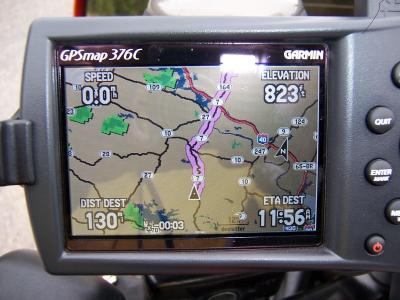
The 376C also has the ability to animate the radar. The unit stores the past 3 images in memory along with the time there were recorded, and then plays them back showing storm direction and speed. The time is displayed as a negative number that shows how many minutes old each image is. So for example, as it animates a storm, you might see
-21, -16, -11, and -5 displayed as the images load. And at the next update cycle the oldest image will drop off and the most recent will be displayed.
You also have the ability to hide the NEXTRAD images so they do not show on the map screen as well as the pressure and wind data. The unit can also display front lines and county warning on the map if you wish to see them. There is Weather Page on the main menu that also allows you to look at the weather images and can also show you forecast maps up to 48 hours in advance.
Map Set Up page
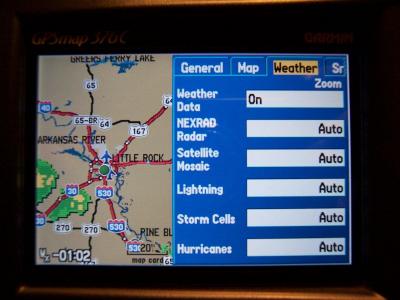
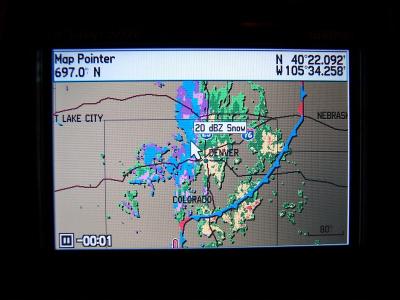
The NEXTRAD is probably the most useful of the all the weather info and allows you to see at a glance what weather lies in your path or intended route and make informed decisions about what to do. You can also scroll the cursor over any area of the US and zoom in on any weather cell you are interested in.
By placing the cursor on a storm, you can see the type/amount of precip
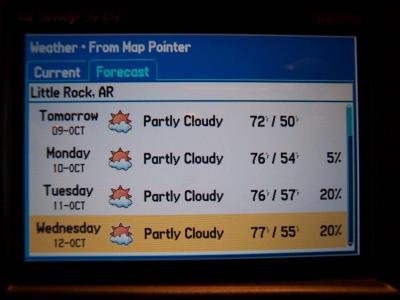
But there are other features to the weather information that are worth mentioning as well. On the Garmin 276C you can scroll the cursor over any city and hit the FIND button and bring up a list of Hotels, restaurants, gas stations as well as their phone numbers to call ahead and make a reservation. Many times I have found this a very useful feature. This feature remains on the 376C and now another menu option has been added. You can now find the current weather conditions as well as a 5 day forecast for any area in the US by simply positioning the cursor over that area and selecting FIND and then WEATHER DATA. It will bring up the data from the closest weather station including Wind, Visibility, Relative Humidity, Dew Point, Pressure, Current/High/Low temperatures, and Ceiling. In essence, you have a portable weather center that has access to data for the entire US right at your disposal. Who needs the weatherman with this thing around!
5 day Forecast screen
Since I already have and XM Roady, I did not (yet) activate the XM radio in the GPS, but the unit has a page for the XM Radio stations that will allow you to select the channel. The audio output is sent out on the same audio lines as the used for the voice navigation, and the power/data plug for the 376C is identical to the 276C with the exception of some of the Data In 2 (green) and Data Out 2 (violet) wires no longer shown in the manual on the 376C, though the wires are still in the cable. The power and voice lines are unchanged. There also is a headphone port on the back of the 376C for connecting headphones or an amplifier to for use with the XM radio. By default, the audio is turned on, and the XM radio tuned to a preview channel. It also receives an Emergency Alert channel as well even without a prescription. This channel broadcasts emergency weather info as well as road closures and other pertinent data. Voice navigation commands mute the audio on both the output port and headphone port. Volume is controlled by pushing the power button one time quickly which brings up a volume and display brightness control window. The cost of adding the XM Audio to the weather package is $6.95 a month, and if you have a current XM Radio subscription, you can put it on the family plan and reduce the price of it by $6.
This review is not yet completed and will be updated after I have more time to use and test this GPS